
Using Sonic object storage in Go

You can use s3 libraries to interact with Sonic's S3-compatible API, like the AWS SDK for Go. To begin, create a storage zone in your account and select the region and storage tier that you prefer. Pushr will create a bucket and will configure CDN routing automatically to cache and accelerate your bucket's content globally.
Create a storage zone
Each storage zone is a bucket + a CDN configuration applied automatically. From the CDN section in your dashboard, create a new storage zone:
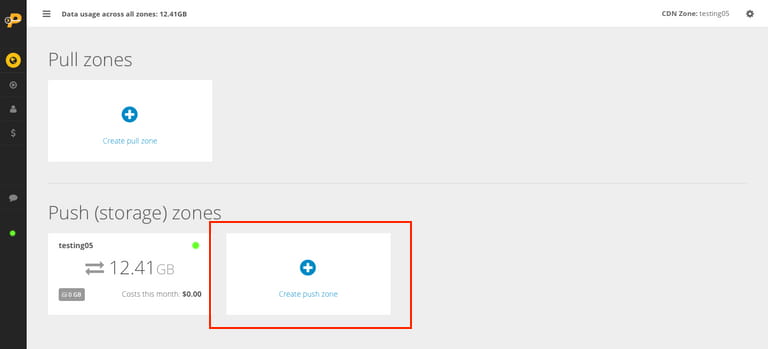
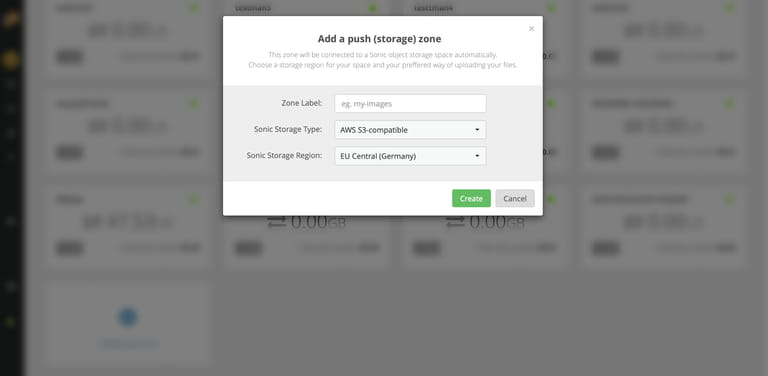
In the popup window that appears, name your zone and select a storage region:
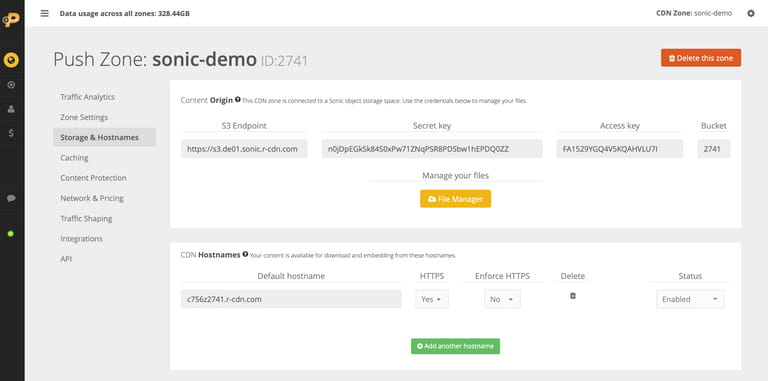
Now with your new storage zone created, click on it to manage it. Navigate to the Storage & Hostnames tab to reveal your storage endpoint, access key, secret key and the bucket name that was generated for you automatically:
Configure Sonic
Install the AWS SDK package:
go get -u github.com/aws/aws-sdk-goConfigure the Sonic S3 endpoint and credentials:
package main

import (
    "os"
    "github.com/aws/aws-sdk-go/aws"
    "github.com/aws/aws-sdk-go/aws/credentials"
    "github.com/aws/aws-sdk-go/aws/session"
    "github.com/aws/aws-sdk-go/service/s3"
)

func main() {
    key := os.Getenv("SPACES_KEY")
    secret := os.Getenv("SPACES_SECRET")

    s3Config := &aws.Config{
        Credentials: credentials.NewStaticCredentials(key, secret, ""),
        Endpoint:    aws.String("https://s3.eu-central.r-cdn.com"),
        Region:      aws.String("us-east-1"),
        S3ForcePathStyle: aws.Bool(false),
    }

    newSession := session.New(s3Config)
    s3Client := s3.New(newSession)
Note: the region variable is set for compatiblity with the AWS SDK, especially bucket creation, but is currently not being used by Sonic. Instead, to create a new bucket, you need to create a new storage zone in your account, and a bucket will be created and attached to it automatically.
Upload an object
package main

import (
    "fmt"
    "os"
    "strings"

    "github.com/aws/aws-sdk-go/aws"
    "github.com/aws/aws-sdk-go/aws/credentials"
    "github.com/aws/aws-sdk-go/aws/session"
    "github.com/aws/aws-sdk-go/service/s3"
)

func main() {
    key := os.Getenv("SONIC_KEY")
    secret := os.Getenv("SONIC_SECRET")

    s3Config := &aws.Config{
        Credentials:      credentials.NewStaticCredentials(key, secret, ""),
        Endpoint:         aws.String("https://s3.eu-central.r-cdn.com"),
        Region:           aws.String("us-east-1"), // required but ignored by Sonic
        S3ForcePathStyle: aws.Bool(false),
    }

    newSession := session.Must(session.NewSession(s3Config))
    s3Client := s3.New(newSession)

    // Example: upload a text file
    bucket := "bucket_id" // change this to your bucket
    objectKey := "example.txt"

    _, err := s3Client.PutObject(&s3.PutObjectInput{
        Bucket: aws.String(bucket),
        Key:    aws.String(objectKey),
        Body:   strings.NewReader("Hi Mom!"),
        ACL:    aws.String("public-read"), // Ignore by Sonic, see Bucket Policy below
    })
    if err != nil {
        panic(err)
    }

    fmt.Printf("File uploaded successfully to %s/%s\n", bucket, objectKey)
}
Bucket policy
Sonic does not support editing of bucket policies. There is one default mixed access policy that applies to each bucket. It has the following characteristics:
• Unauthenticated requests can download files from the bucket url/CDN hostname via direct links.
• Only authenticated requests can write, list and tag objects towards the S3 endpoint. This behaviour is equivalent to disabling AWS's Block Public Access setting.